Bundle Tracking
Identify and track bundles — groups of wallets that coordinated buys at token launch. Bundle Tracking helps you spot insider activity, sniper clusters, and identify KOL payments so that you can trade accordingly.
Full Video Tutorial
Instructions
-
Navigate to the Bundle Tracking tab and enter the token contract address you want to analyse.
-
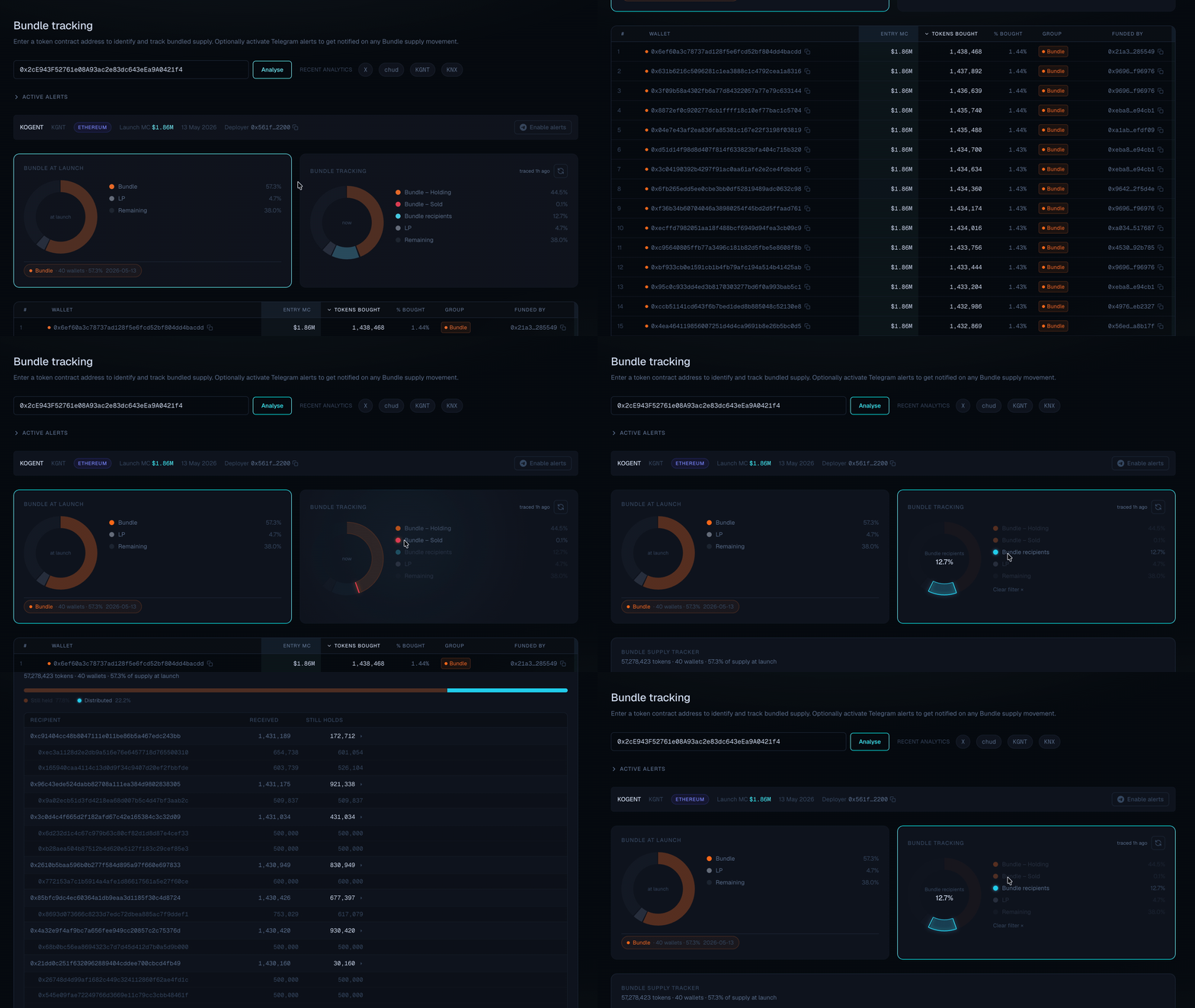
Press Analyse to fetch all wallets that bundle bought the token launch. ChainQuant will group wallets that share common buy patterns into bundles.
-
Review the detected bundles. Each bundle shows the wallets involved, their combined holdings, and the percentage of supply they control.
-
To receive alerts for bundled supplly movements, click Enable alerts and link your Telegram group ID (use /getid via ChainQuantBot as admin).
-
You will receive live Telegram alerts when any wallet in the bundle transacts.
-
By clicking the Bundle tracking card, you can review the Bundle status, including ‘Holding’, ‘Sold’ and ‘Bundle recipient’. Bundle recipients often involve wallets from KOLs.
Bundle detection is based on on-chain launch activity. For best results, analyse tokens shortly after launch before wallets redistribute holdings.