Organising Wallet Lists
Organise the wallets you want to monitor into named groups. Groups are the foundation for supply tracking, sell rule compliance, and Telegram alerts — everything works off the lists you build here.
Full Video Tutorial
Instructions
-
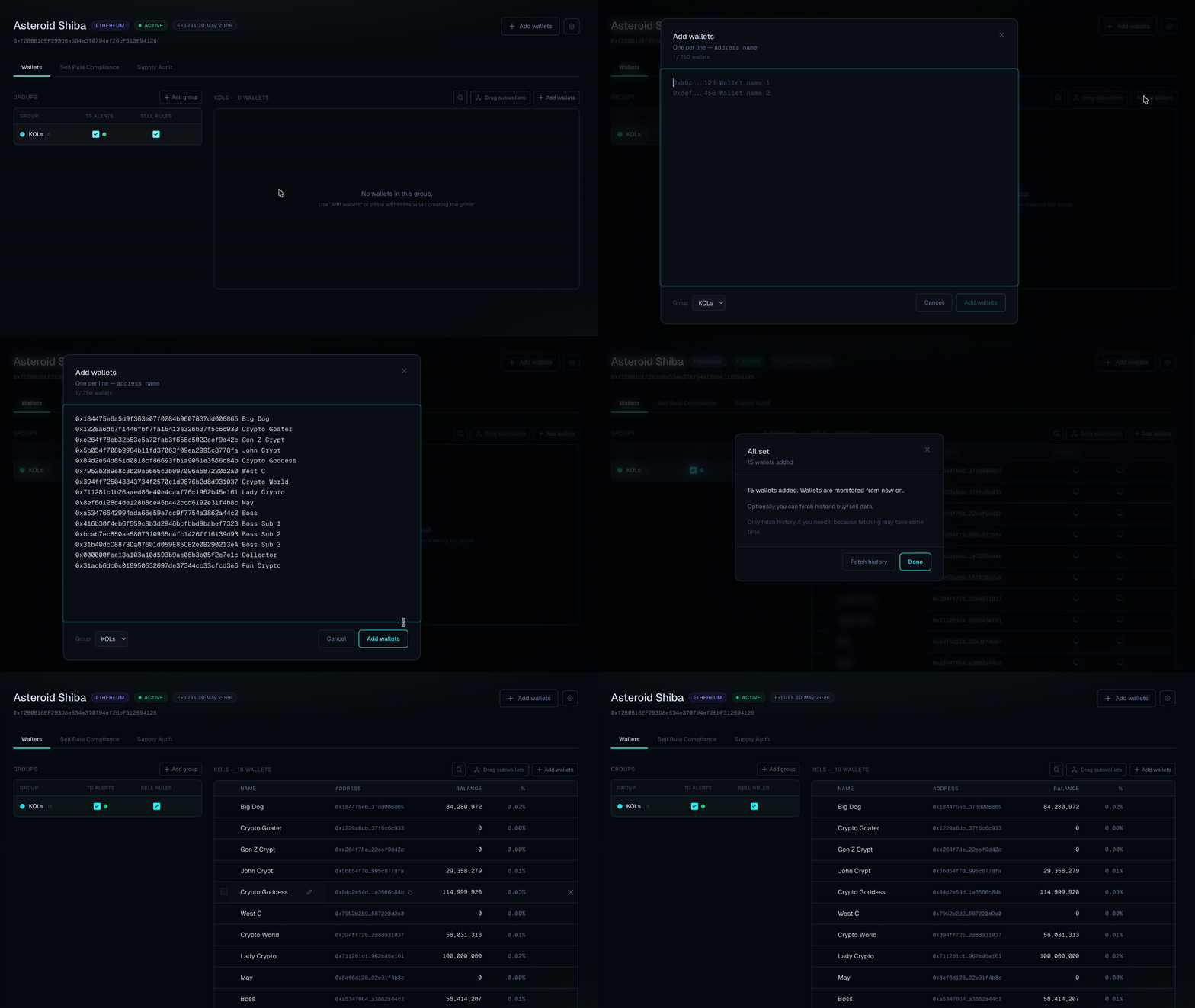
Go to the Wallets tab and create the groups you need.
Commonly used groups are KOLs, Team, MM, and Snipers.
You can create as many groups as needed and toggle features per group independently. -
When creating a group, paste the wallets addresses, each address on a new line.
If needed, give each wallet a clear label so it is easy to identify across dashboards and alerts.
Addresses and names should be separated with a space. -
Enable the features you want per group:
- Sell Rules — monitor whether wallets in this group comply with your configured sell rules.
- Telegram Notifications — receive live alerts and be tagged when activity is detected for wallets in this group.
-
When needed, select multiple wallets and press Create cluster to cluster wallets which belong to a single entity.
-
Wallets and groups you create here are shared across all features.
They appear in the Supply Audit for supply distribution classification, the Sell Rule Compliance dashboard for compliance tracking, and in Telegram alert messages.
Wallets added to a group before any on-chain activity occurs will have the most accurate historical data. If you add a wallet retroactively, use the Fetch History function — note that this may result in less complete data for past transactions.